The scale of this problem is larger than most people realize. According to Cyberhaven's 2026 AI Adoption and Risk Report, 39.7% of AI interactions involve sensitive data, with employees inputting sensitive information into tools like ChatGPT, Claude, and Perplexity on average once every three days.
Unlike a traditional breach triggered by an attacker, AI data leakage requires no stolen credentials and no malicious intent. It requires only a paste command and a poorly considered prompt.
This guide is written for employees, not IT teams. The goal is to give you a clear, practical understanding of what the risks actually are, what never to share, and what habits will protect you, your organization, and your customers.
Key Takeaways
- Never paste customer data, credentials, source code, or internal financials into any public AI chatbot.
- Enterprise accounts come with data retention protections that free consumer accounts do not. Always use your employer-approved tool.
- Anonymize before you prompt: replace real names, IDs, and project names with placeholders before typing.
- Compliance risk is real: sharing personal data with an external AI tool can violate GDPR, HIPAA, or CCPA.
- Treat every prompt like an external email: once data leaves your system, you lose control of where it goes.
Why AI Chatbots Create a Data Leakage Risk
How Ordinary Work Becomes a Data Leak
AI data leakage happens when sensitive information — customer PII, proprietary source code, internal financial projections — enters a public or third-party AI model where it may be retained, used for model training, or surfaced to other users.
There is no attacker. No stolen password. Just a well-meaning employee doing their job.
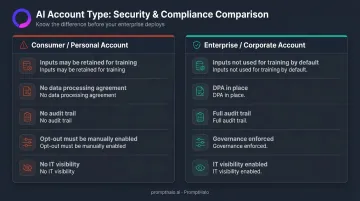
Most platforms default to retaining user prompts for model improvement unless organizations explicitly opt out. OpenAI's consumer and personal services, for example, may use content to train future models unless users disable this setting. Google's Gemini Apps Privacy Hub explicitly warns users not to enter confidential information they wouldn't want a reviewer to see.
Under enterprise agreements, the dynamic changes. OpenAI Business, ChatGPT Enterprise, and Anthropic's commercial API do not train on inputs by default. That gap between a personal account and a corporate account is exactly where most leakage happens.
The Shadow AI Problem
Many employees aren't using their organization's approved AI tools at all. Gartner found that 69% of organizations suspect or have confirmed evidence that employees are using prohibited public GenAI tools, and predicts that by 2030, more than 40% of enterprises will experience security or compliance incidents as a result.
These personal or unapproved tools operate entirely outside IT visibility — no governance, no data processing agreements, no audit trail. And shadow AI isn't limited to rogue actors; it's often the fastest worker on the team reaching for whatever tool gets the job done.
RAG Systems Carry Their Own Risks
Approved internal AI tools carry their own exposure vectors, too. Retrieval-Augmented Generation (RAG) systems — AI tools connected to internal knowledge bases — can surface restricted documents to users who shouldn't have access. This happens when vector databases strip the original document permissions during the embedding process, leaving no access controls on what the AI can retrieve and return.
OWASP's GenAI Security Project identifies vector and embedding weaknesses as a documented LLM application risk, noting that misaligned access controls can lead to unauthorized data access through embedding stores.
The Regulatory Consequence Is Real
Transferring personal data to a third-party AI tool without a proper data processing agreement can constitute a GDPR, HIPAA, or CCPA violation — regardless of intent.
Italy's data protection authority fined OpenAI €15 million in December 2024 following a ChatGPT investigation centered on transparency and legal basis for processing personal data. The investigation focused specifically on whether OpenAI had a valid legal basis to collect and process the personal data used to train its models — a question that applies equally to any organization feeding customer or employee data into consumer AI tools without a proper data processing agreement in place.
Safety Guidelines for Using AI Chatbots at Work
Staying safe requires discipline at three layers: tool selection, prompting behavior, and system-level controls. No single layer is sufficient on its own.
Before You Start: Choosing and Configuring Your AI Tool
- Use only employer-approved platforms and log in with your corporate credentials, not a personal account. Free consumer accounts lack the contractual data processing agreements that enterprise accounts provide.
- Check your tool's data retention settings. Some tools require you to manually disable training opt-ins — don't assume the default is safe.
- Find and read your organization's AI acceptable use policy. It should list approved tools, prohibited data categories, and how to request approval for new tools.
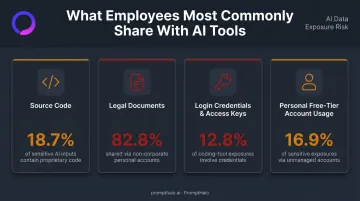
Using a personal ChatGPT or Claude account for work tasks — even once — means your inputs may be used to train public models. Cyberhaven found that 73.8% of ChatGPT usage occurs through non-corporate accounts, with 82.8% of legal documents sent to AI tools flowing through those non-corporate accounts.
Safe Habits While Prompting
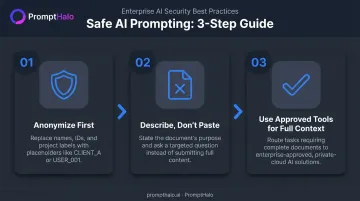
Apply the "anonymize before you prompt" rule. Before typing or pasting anything into an AI chatbot, replace real names, client identifiers, account numbers, and internal project names with placeholders — "CLIENT_A," "Project X," "USER_001." This single habit prevents the majority of accidental leakage events.
Never copy-paste full documents into a public AI tool. Employees frequently attach complete contracts, HR files, or client presentations for summarization or editing, transferring far more sensitive content than the task actually requires. Instead:
- Describe the document's purpose in general terms
- Ask a structural or formatting question rather than submitting the content itself
- Use an enterprise-approved on-premise or private-cloud AI solution for tasks that require full document context
Treat AI chat history as a permanent record. Even when a session appears to have expired, platforms may retain logs for extended periods. Clearing your chat history on the front end does not guarantee the underlying data has been deleted from the provider's servers.
Organizational and System-Level Safeguards
Employee behavior alone isn't enough. Organizations need technical controls that enforce data safety at the system level.
AI-aware data loss prevention (DLP) tools scan prompts in real time and can block or redact sensitive content before it reaches an external AI endpoint. These tools are built specifically for AI interactions — unlike traditional DLP systems designed for email and file transfers, which miss the patterns that appear in conversational prompts.
For organizations running agentic AI or multi-model deployments, runtime security goes a step further. PromptHalo's Runtime Security platform sits inline on every inference, tool call, and agent-to-agent handoff, making per-action decisions in under 100ms. For each action, it can:
- Allow, restrict, challenge, deny, or monitor in real time
- Block data leakage, prompt injection, and out-of-scope tool calls before they execute
- Cover any AI deployment from any vendor, without touching the underlying model
It deploys in under a day with no model retraining and no code rewrite required.
For RAG deployments specifically, PromptHalo inspects responses in real time and enforces data-access policy, blocking protected documents from reaching users who lack access — addressing the permission-stripping risk that vector databases introduce.
What Employees Should Never Share With AI Chatbots
Five categories account for the vast majority of leakage events. Treat each as completely off-limits for any public or free-tier AI tool.
Customer and Personal Data (PII/PHI)
Full names, email addresses, account numbers, billing details, health records, or any information that could identify a real person must never be entered into an AI chatbot. Submitting this data to a third-party model counts as an unauthorized data transfer and can trigger GDPR, HIPAA, or CCPA violations regardless of intent.
This applies equally to paraphrased versions. If the information is still identifiable, the risk is the same.
Source Code and Proprietary Technical Information
Pasting proprietary source code, internal API keys, system architecture details, or configuration files into a public AI chatbot is one of the most frequent — and expensive — data exposure mistakes organizations make. Netskope found that source code accounts for nearly half of all data policy violations for generative AI apps, and Cyberhaven found that source code makes up 18.7% of sensitive data shared with AI tools.
Once submitted, that intellectual property can be retained by the model and later appear in responses to other users — sometimes in fragments, sometimes paraphrased, and rarely in a way you can track or reverse.
Financial and Strategic Business Data
This category includes:
- Unreleased financial forecasts and earnings projections
- M&A discussions or deal terms
- Pricing strategies and discount structures
- Client contract terms and SLA commitments
- Internal product roadmaps
Even a partial paste of a financial spreadsheet or a summary of a confidential proposal is enough to constitute a material leak.
Login Credentials, Tokens, and Secrets
Real usernames, passwords, API tokens, and authentication secrets must never be entered into any AI chatbot — including for debugging help. Harmonic Security found that 12.8% of coding-tool exposures involve access keys, including API tokens, credentials, and secrets. AI-generated outputs or logs may retain these secrets and expose them later, often in ways that are difficult to trace.
If you're debugging an authentication issue, redact all actual credentials and replace them with example values before pasting any code.
Common AI Chatbot Safety Mistakes to Avoid
Most data leakage incidents aren't caused by sophisticated attacks — they're caused by routine habits that feel harmless. These four mistakes show up repeatedly across enterprise AI deployments.
Assuming free AI tools are "private enough" for work tasks. Free-tier accounts commonly train on user inputs unless explicitly disabled. Harmonic Security found that 16.9% of sensitive data exposures flow specifically through personal free-tier accounts — making this assumption one of the most common and costly mistakes employees make.
Uploading entire documents instead of describing the task. When employees attach full contracts, HR files, or client presentations for summarization, they transfer far more sensitive content than the task requires. Describe the document's purpose and ask a targeted question instead.
Using personal accounts for convenience. The one-click convenience of a personal account bypasses every governance and data retention control the organization has negotiated. Account choice matters as much as tool choice — which account tier and vendor contract govern where your data goes is the real risk factor.
Dismissing real-time alerts and DLP warnings. Enterprise AI tools and DLP systems surface warnings when a prompt appears to contain sensitive content. Bypassing them deliberately creates personal liability, not just organizational risk.
Conclusion
Safe AI use at work depends on three things working together: employees who understand what not to share and why, organizational policies that define approved tools and data handling rules, and technical controls that enforce those policies in real time.
No single layer holds on its own:
- Policies without enforcement get ignored under deadline pressure
- Controls without employee understanding create friction but not protection
- Awareness without technical safeguards leaves too much room for honest mistakes
Treat AI safety the way you treat email security — not as an obstacle to getting work done, but as a professional habit that protects your customers, your colleagues, and your organization. A single careless prompt can expose customer records, trigger a compliance incident, or hand an attacker a foothold. Getting the habit right costs nothing. Getting it wrong can cost considerably more.
Frequently Asked Questions
What control is recommended to prevent data leakage through AI applications?
Organizations should combine AI-aware DLP tools that scan and block sensitive content in real time with a clear AI acceptable use policy listing approved tools and prohibited data categories. Runtime security platforms like PromptHalo add an enforcement layer that intercepts leakage inline before it reaches an external endpoint.
What should you avoid sharing when interacting with AI systems to ensure data privacy?
The key off-limits categories are customer PII, source code, login credentials, internal financial data, and confidential business plans. Even partial or paraphrased versions of this information carry meaningful risk when entered into public or free-tier AI tools.
Is it safe to use free AI chatbot accounts like ChatGPT's free tier for work tasks?
Free consumer accounts typically lack the data retention and training opt-out protections available through enterprise agreements, meaning inputs may be used to train future model versions. Any work task involving non-public information should use an employer-approved enterprise account.
What is prompt hygiene and why does it matter for data security?
Prompt hygiene is the practice of reviewing and sanitizing AI prompts before submission: replacing real names, client identifiers, and sensitive details with anonymized placeholders. Done consistently, it prevents most accidental leakage events without reducing the value you get from AI tools.
Can my employer see what I type into AI chatbots?
On corporate devices and networks, enterprise DLP tools and user activity monitoring solutions can log AI interactions at the endpoint level, giving employers visibility into prompt content. Treat AI prompts as professional communications, not private notes.
What should I do if I accidentally shared sensitive data with an AI chatbot?
Report the incident to your IT or security team immediately, document what was shared and which tool was used, and follow your organization's incident response procedure. Prompt reporting limits exposure and satisfies mandatory incident notification requirements in regulated industries.